Topics
Topics
The Salesforce Data 360 Glossary: Key Terms and Features
Updated on
June 15, 2026
Reading time
8 minutes


At a Glance
- Salesforce Data 360 (formerly Data Cloud) is the central platform for unifying customer data from multiple sources in real time.
- Zero-Copy Federation enables teams to use data from external systems such as Snowflake or Databricks directly, without copying it or relying on complex ETL processes.
- Data 360 is the data foundation for Agentforce: AI agents access the platform to act with rich context and up-to-date information.
- Features such as Intelligent Context also make unstructured data, such as PDFs or documents, accessible to AI agents.
- Success with Data 360 depends less on the technology than on the quality of your data and the maturity of your processes.
What Is Data 360?
Salesforce Data 360 is a real-time data platform that helps organisations unify customer data from multiple sources to enable valuable insights and personalised experiences. By integrating data from different Salesforce applications, as well as other systems, software and devices, organisations can understand their customers better and engage them more effectively. With the support of Artificial Intelligence (AI) and automation, Data 360 analyses data in real time and triggers actions based on those insights.
Data Cloud Becomes Data 360
Data 360 was known as Salesforce Data Cloud until autumn 2025. With the renaming, Salesforce places greater emphasis on the strategic role of data within the platform. Functionally, the solution remains unchanged: it brings data from different sources together in a central customer data platform, unifies it, and makes it usable for applications across sales, service, and marketing. The change therefore primarily affects the positioning: data is not only captured and stored – it forms the foundation for AI, automations, and AI agents.
How Data 360 Works
Simply explained: Imagine customer information is like puzzle pieces scattered around your house. Data 360 is like a smart assistant that gathers these pieces, puts them together, and presents you with the complete picture.
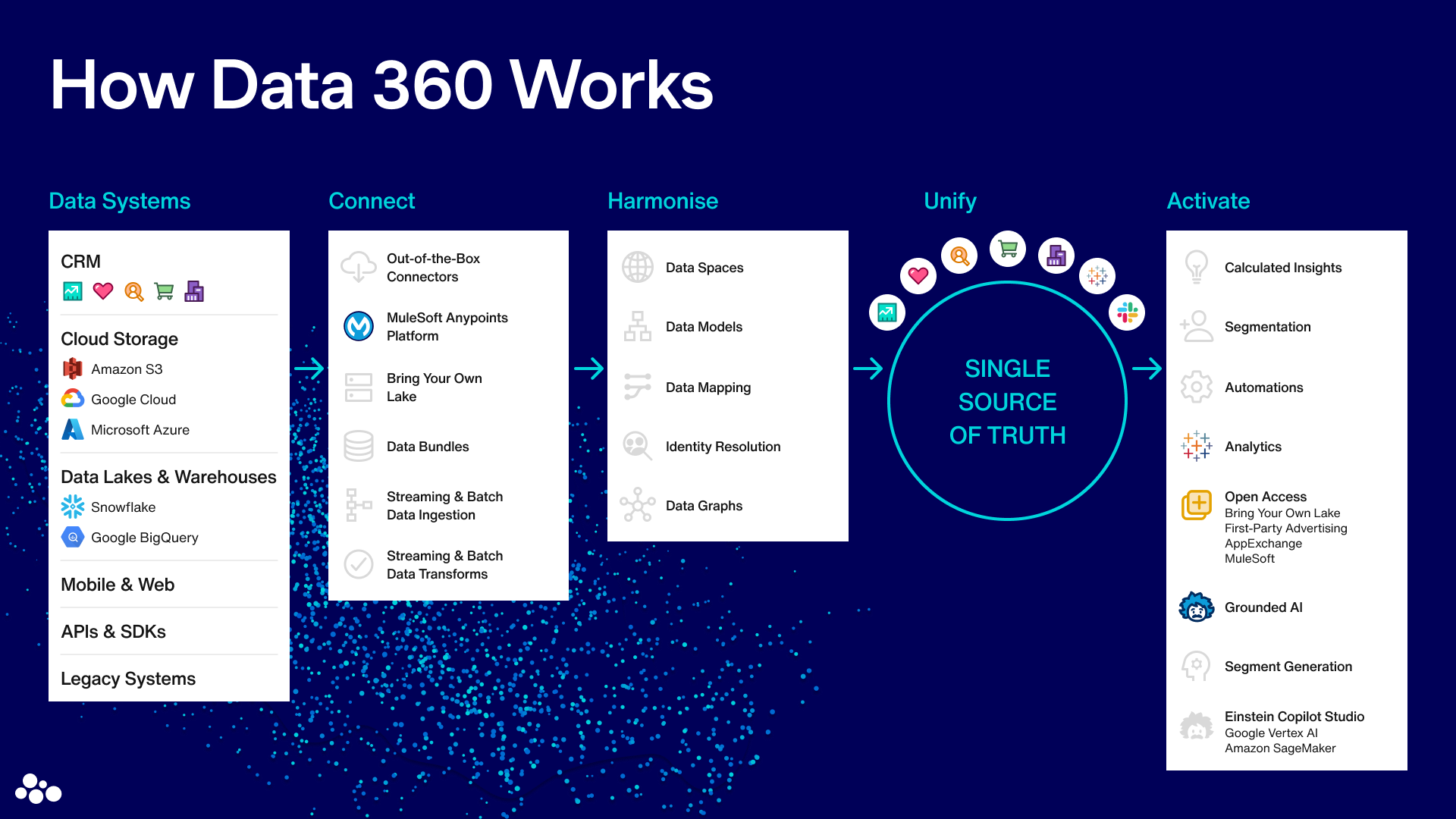
Core Components of Data 360
Data 360 comprises four main components: Connect, Harmonise, Engage and Experience.
Connect: How to Connect Your Data
Salesforce Data 360 provides connectors for the seamless integration of internal Salesforce applications and external sources. These integrations are possible:
- Salesforce Applications: Use connectors for Marketing Cloud, Sales Cloud and Service Cloud to integrate data from your existing Salesforce applications.
- External Sources: With MuleSoft connectors, you can integrate data from external sources such as AWS, Google Cloud and Azure. For example, you can import customer data from an Amazon S3 bucket or integrate transaction data from Google Cloud Storage.
- Real-Time Streams: Integrate data from real-time streams, e.g. web interactions or IoT devices. Use these connections to transfer real-time data from platforms such as Apache Kafka or AWS Kinesis into Data 360.
- Mobile and Web Apps: With Software Development Kits (SDKs) for mobile and web applications, you can ingest user data directly into Data 360. This enables you to capture and process data from mobile devices and web browsers in real time.
Use Cases: Linking Data in Data 360
- E-Commerce Platform: Online retailers can store sales data from their e-commerce platform in Amazon S3 and then integrate it into Data 360 to build comprehensive customer profiles and develop personalised marketing campaigns.
- Marketing Campaigns: Use data from Marketing Cloud to analyse customer interactions and campaign results. You can update this data in real time to optimise ongoing campaigns immediately.
- IoT Devices: A smart home device manufacturer can collect sensor data from its devices and integrate these data streams into Data 360. This provides real-time insights into device usage patterns, leading to enhanced product functionality and improved customer service.
Key Terms
Topic: Data Architecture
A Customer Data Platform (CDP) is software that serves as a central database in which all customer data from various sources is collected, integrated, and managed. A CDP brings together data from different channels and systems such as CRM, e-commerce, and apps to create a comprehensive customer profile. This consolidated data enables a unified view of the customer across various business processes.
A data lakehouse combines the advantages of a data lake and a data warehouse to store and manage both structured and unstructured data. It provides the flexibility of a data lake for storing large volumes of unstructured data, along with the structure and governance of a data warehouse for managing and analyzing that data. This enables organizations to generate insights from their data faster.
A data model is a structured representation of data that describes its organization, relationships, and rules. It includes Data Model Objects (DMOs), defined as groups of attributes that organize data from various sources. By storing data in a standardized way, integration and analysis are simplified.
The Data Model enables the collected data from various sources to be modelled and structured so it can be used efficiently for analysis, reporting, and activation purposes. For example, the Data Model can define how customer data from Salesforce is linked with demographic data from external sources to create targeted marketing segments.
Data Model Objects (DMOs) are a grouping of data created from data streams in Salesforce and other sources. DMOs can be standard or custom.
Segments are groups of objects, such as individuals in the B2C sector, that share a set of common characteristics.
Topic: Data Integration and Interfaces
An Application Programming Interface (API) is an interface that enables different applications to communicate and exchange data. It defines, through rules and protocols, how software components interact with each other.
In Data 360, the API is used to retrieve data from various external data sources and integrate it into Data 360. It enables specific operations such as querying data, retrieving metadata, or triggering events.
Zero-Copy Federation is an integration technology that enables Data 360 to access data directly in external systems without physically copying it into Salesforce. It supports platforms such as Snowflake, Databricks, Google BigQuery, and Amazon Redshift. This eliminates time-intensive ETL processes, reduces latency, and ensures AI agents always work with up-to-date data.
Example: A company stores its transaction data in Snowflake. Instead of importing it into Data 360, they query it directly via Zero-Copy, making it immediately available for segmentation, analytics and Agentforce agents.
Topic: AI, Insights and Personalisation
Calculated Insight (CI) is a tool in Data 360 that queries stored data, transforms it, and performs complex calculations.
Identity Resolution is the process of identity management by matching data about individuals to create a comprehensive view, referred to as a unified profile.
Data Explorer is a tool in Data 360 that enables users to view data from a Data Model Object (DMO), Data Lake Object (DLO), or Computed Insight Object (CIO). The Data Explorer provides a user-friendly interface for browsing, analyzing, and validating data.
A DLO, in turn, is a container for raw data that has been imported from various sources and stored in its original format. This facilitates the analysis and understanding of large, complex data sets.
Example: Imagine you have imported sales data from an e-commerce platform into a DLO. With the Data Explorer, you can browse this data to analyze sales figures for different products. You can quickly identify which products sell best and spot seasonal trends. You can also cleanse the data and prepare it for further analysis in Calculated Insights (CIOs) to obtain more detailed information.
Intelligent Context is a Data 360 feature that automatically extracts and structures unstructured data such as PDFs, images, tables, or process documents and makes it accessible to Agentforce AI Agents. This enables agents to access more than structured CRM data – they can also draw on an organisation’s complex, document-based knowledge.
Example: A service team member asks Agentforce about a product’s returns policy. Intelligent Context pulls the relevant passage from the PDF manual and provides the agent with the correct answer – without manual data maintenance.
Tableau Semantics ensures that metrics and KPIs are defined consistently across all analyses and teams. When “revenue” or “active customers” are standardised across the organisation, all reports – whether in Tableau, CRM Analytics or Agentforce – deliver identical results.
Topic: Data Activation and Governance
An activation is the process of publishing a segment to activation platforms (targets). Activation means sending the data of a specific customer segment to a platform such as Marketing Cloud, Google Ads, or Facebook Ads to run targeted marketing campaigns.
Example: Suppose you have created a segment of customers who have purchased a specific product in the last 30 days. The activation process sends this segment to Marketing Cloud, where automated email campaigns are triggered. At the same time, the segment is sent to Google Ads to display targeted adverts for related products. This allows you to reach your customers across multiple channels with relevant offers.
Data 360 provides integrated governance capabilities that support data protection requirements such as the GDPR directly at platform level. These include AI-powered classification and tagging of sensitive data (e.g. personal data/PII) as well as so-called Clean Rooms – secure collaboration environments where organisations can analyse data with partners without exposing raw data.
Especially in Germany and the DACH region, data protection is a key decision criterion. Data 360 provides native support here, rather than adding compliance as an afterthought.

Data for Your Intelligent Organisation
AI is only as effective as the data it is built on. We work with you to develop a holistic data strategy and turn your data into robust decision-making foundations for productive AI applications.
Connect, Prepare and Model Data
To get started with Data 360, connect a data source either via a direct connection or through a data import. With a direct connection – also known as data federation – Data 360 uses the data directly from the source in real time, without needing to copy it into Data 360. With a data import – also known as data ingestion – Data 360 loads the data in its original format and stores it in a dedicated repository known as a Data Lake Object (DLO).
Since autumn 2025, Data 360 also supports Zero-Copy Federation: data can be queried directly from external platforms such as Snowflake or Databricks without having to import it into Data 360.
You can connect data sources such as Marketing Cloud, Amazon S3, and Google Storage to Data 360 via a dedicated connector. Select the connector for the data source you want to import data from, then specify the object or dataset you want to link or ingest. Data 360 retrieves a sample of your data and provides a recommended source schema for review.
A data stream uses a connector to establish a connection to a data source. It acts as a pipeline to connect data with Data 360. The received data is organized in a schema and stored as Data Lake Objects.
The data from all data streams is written to Data Lake Objects (DLOs). After you create your data streams, you must map your DLOs to the Data Model Object (DMO). Only mapped fields and objects with relationships can be used for segmentation and activation.
A Data Graph combines and transforms normalized tabular data from Data Model Objects (DMOs) into new, materialized views of your data. Because the data is precomputed, fewer queries are required and queries respond in near real time. Real-time data graphs are required to perform identity resolution, calculations, or segmentation in real time.
Insights and Personalization in Data 360
Use the tools and features of Salesforce Data 360 to gain deep insights into your data and create highly personalized experiences for your customers. With calculated insights, streaming insights, real-time insights, and the Visual Insight Builder, you can define comprehensive metrics and analyze data in real time.
Use Calculated Insights to define and calculate multidimensional metrics for your entire digital health in Data 360. You can create metrics at the profile, segment, and population levels.
Gain insights faster by building metrics on streaming data. Streaming Insights are queries that continuously refresh and are based on the latest data. This enables you to get real-time information about your customers’ engagement and respond quickly.
Use Real Time Insights to create more complex personalization logic for your website. These analytics enable you to track cumulative activity and determine whether a user’s activity meets defined thresholds.
This user-friendly tool enables you to create visual representations of your data without in-depth technical expertise. This allows you to run analyses quickly and efficiently and gain valuable insights to help you make informed decisions.
Analyze Data in Data 360
Use the powerful analytics tools in Salesforce Data 360 to analyze your unified and harmonized data. With Tableau, CRM Analytics, and Data 360 reports and dashboards, you can gain deep insights, create standard reports, and run targeted analyses that drive business success and enable personalized customer experiences.
Create standard reports on one or more related Data Model Objects (DMOs) or calculated insights to determine which business areas you should focus on.
Tableau, combined with Data 360, offers extensive capabilities for data analysis and visualisation. With Tableau, you can create interactive dashboards and present complex datasets in clear, easy-to-understand visuals. The software enables real-time analysis and allows you to share reports and dashboards with your teams.
Tableau Next is the next generation of the tool, launched on the Salesforce Core Platform in 2025. It connects Tableau visualisations directly with Data 360 and Agentforce, enabling AI-powered, agent-based analytics without media discontinuities.
Data 360 enables you to run exploratory analyses of data at different stages of its lifecycle using CRM Analytics.
Unlike Tableau, which specialises in visualising data from a wide range of data sources and supporting complex requirements, CRM Analytics is designed for Salesforce and CRM use cases.
Marketing Cloud Intelligence (formerly Datorama) is part of Salesforce Marketing Cloud and an integrated marketing intelligence platform. It enables organisations to aggregate, analyse and visualise data from multiple marketing channels. With Marketing Cloud Intelligence, marketing teams create comprehensive reports and dashboards to monitor and optimise campaign performance. It supports data source integration, data visualisation and advanced analytics.
In March 2025, Salesforce announced Marketing Intelligence (MI) as a new generation of the tool. It is built on the Salesforce Core Platform and combines the data integration of Data 360, the AI capabilities of Agentforce, and the visualisations of Tableau Next. The goal is to give analysts less time spent on technical configuration and more time for decision-making.
Conclusion and Recommendations for Action on Data 360
Salesforce Data 360 enables organisations to integrate, analyse and use customer data from multiple sources. This extension of the Salesforce Core Platform improves decision-making, creates personalised experiences and optimises business processes.
Since the rebranding to Data 360 in autumn 2025, the platform takes on a new strategic role: it provides the data foundation for Agentforce. AI agents across Sales, Service and Marketing draw on Data 360 to act on up-to-date, context-rich insight. Organisations looking to deploy AI agents should therefore use Data 360 as the underlying foundation.
To fully realise the benefits of Salesforce Data 360, you should:
- Prepare Data Architecture and Quality: First, review your data quality and establish a clear data architecture to ensure you can use Data 360 effectively.
- Unify Data: Integrate your company data from multiple sources into Data 360 using connectors, interfaces or zero-copy federation. Ensure clean data mapping and consistent field names to create complete, reliable customer profiles. When developing interfaces or connecting systems, we recommend consulting an experienced Salesforce Partner.
- Introduce Automation: Automate service, marketing and sales processes to benefit from real-time insights. Automation and activation on the Salesforce Platform enable your team members to act on recommendations straight away, eliminating manual steps.
- Qualify Data for AI Agents: Agentforce relies on a robust data foundation. Make sure your data is complete, up to date, and consistent enough to support AI-driven decisions. This includes clear segment definitions, well-maintained Calculated Insights and – where it adds value – making unstructured documents available via Intelligent Context.
These steps help you maximise the potential of Data 360 and pursue a data-driven, customer-centric strategy.
Do you have any further questions about Data 360 features or implementation? Get in touch. Our experts will be happy to advise you.